

How to Use Baidu's AI Traffic Analysis: Citations, Impressions and Clicks from Baidu AI Answers

Baidu Search Resource Platform's AI Traffic Analysis lets a website see, for the first time, how often Baidu's AI answers cite it and how many people see and click those citations. It covers Baidu search only, not DeepSeek or Doubao, so treat it as your Baidu-side GEO baseline.
First: it lives in the webmaster platform, not Baidu Tongji
When marketers hear that Baidu now shows AI traffic, many go looking in Baidu Tongji, Baidu's web analytics tool. The feature is actually in the Baidu Search Resource Platform (formerly Baidu Webmaster Tools), under a menu item called AI Traffic Analysis (AI流量分析).
The two tools do different jobs. The webmaster platform shows the Baidu search side: how often your pages are cited, seen and clicked in Baidu's AI answers. Baidu Tongji shows what happens after people arrive: where they came from, which pages they viewed and whether they converted. To understand what AI brings to your site, you need both.
According to a September 2026 report by Chinaz, Baidu announced the feature to site owners through in-platform messages and is rolling it out in phases.
Where to find it
- Sign in to Baidu Search Resource Platform with a Baidu account. Your site must already be added and verified.
- Open the site from Site Management, then click AI Traffic Analysis at the bottom of the left-hand menu, alongside sections such as Resource Submission and Data Statistics.
- Newly verified or newly launched sites may show zeros for a while. Chinaz, relaying the platform notice, says blank data right after verification is normal and figures take about one to two weeks to stabilize.
If your site exists in several versions, such as http and https or with and without www, add and verify the canonical domain you actually use. Otherwise the data is split across separate site entries.
What the page shows: four metrics and two rankings
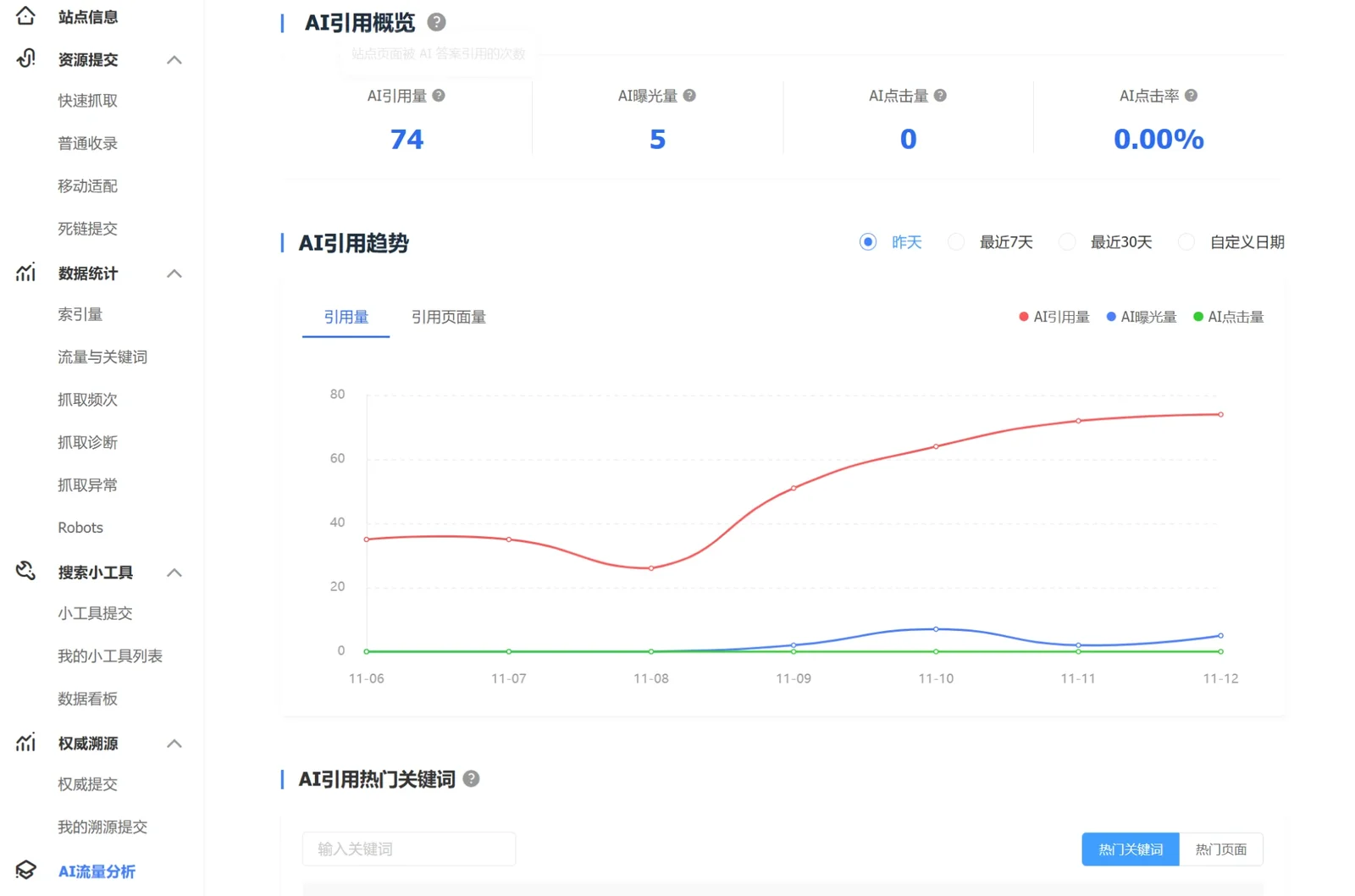
The page has three parts:
- AI citation overview: AI citations, AI impressions, AI clicks and AI click rate.
- AI citation trend: yesterday, the last 7 days, the last 30 days or a custom range. You can switch between citations and cited pages, and compare the citation, impression and click lines.
- Top keywords / top pages: two tabs listing the search queries that triggered citations and the pages that were cited, each with citations, impressions, clicks and click rate. Both tables can be downloaded.
| Metric | What it counts |
|---|---|
| AI citations | Times your pages were cited in Baidu AI answers |
| AI impressions | Times users saw the link to a cited page |
| AI clicks | Times users clicked a cited page |
| AI click rate | AI clicks divided by AI citations |
| Cited pages | How many of your pages have been cited |
The AI citations definition comes from the on-page tooltip (times your site's pages were cited in AI answers); the others follow Chinaz's account of the platform notice. The page itself also states that data covers traditional search only, is updated daily with the previous day's figures and may be delayed, and that the keyword and page lists are sorted by clicks and show at most the top 50,000 entries.
How to read it: four common patterns
These are interpretations from our own GEO work, not Baidu's official guidance:
- Many citations, few clicks: the AI uses your content as answer material and users get what they need without clicking. Check that the cited passages carry your brand name and key message, so citations still build awareness.
- Fewer citations, high click rate: the AI answer leaves users wanting more. Prioritize the conversion path on those landing pages, with a clear enquiry option and related service information.
- Citations concentrated on a few pages: other pages lack citable structure. Copy what works on the cited pages: clear conclusions, FAQs and sourced data.
- Top keywords unrelated to your business: AI is citing peripheral content. Build focused content around your core service terms.
The top keyword list also works as a content planning tool: turning heavily cited but rarely clicked questions into dedicated FAQs or guides usually beats choosing topics by instinct. For a broader method, see our GEO starter guide.
Pair it with Baidu Tongji to see what happens after the click
AI Traffic Analysis stops at the click. How long visitors stay and whether they leave a lead is visible in Baidu Tongji or GA4:
- Download the top pages table from AI Traffic Analysis to get the pages that are cited and clicked most.
- In Baidu Tongji, open the visited pages or landing pages report and check time on page, bounce rate and conversions for those pages.
- To see visits from the web versions of AI assistants such as DeepSeek, Doubao and Yuanbao, look for their referring domains under external links in Baidu Tongji's traffic sources. Clicks inside apps often arrive without referrer data and are counted as direct traffic, so this number usually understates AI visits.
At the time of writing we have not found a dedicated AI traffic report in Baidu Tongji; if one launches, follow Baidu's official documentation.
What it cannot show
- It covers AI answers in Baidu's traditional search only, not standalone assistants such as DeepSeek, Doubao, Yuanbao or Kimi.
- It shows your own site only, with no competitor comparison.
- It does not tell you whether AI answers describe your brand accurately, or whether the tone is positive or negative.
That makes it a good Baidu-side baseline for GEO. To see your brand's visibility across large language models and benchmark it against competitors, you need dedicated monitoring such as Brand Pulse, built in-house by Dékuple China. To assess how your brand performs in AI search, see our generative engine optimization (GEO) service.
Key Data & Sources
| Data | Value | Source |
|---|---|---|
| Time for AI Traffic Analysis data to stabilize after site verification | About 1–2 weeks | Chinaz, September 2026 |
| Maximum entries shown in the top keyword / top page lists | Top 50,000 by clicks | Baidu Search Resource Platform, AI Traffic Analysis page notes (login required, November 2026) |
FAQ
Can I see AI traffic in Baidu Tongji?
As of November 2026 we have not found a dedicated AI traffic report in Baidu Tongji. Citation, impression and click data for Baidu's AI answers is in AI Traffic Analysis on Baidu Search Resource Platform; on-site behavior after the click is in Baidu Tongji.
Why does my AI Traffic Analysis show zero?
There are three common reasons: the site was only just verified, the feature is still rolling out in phases, or your pages have not been cited yet. Chinaz, relaying the platform notice, says data takes about one to two weeks to stabilize. Also check you are looking at the canonical domain your site actually uses.
Does it include DeepSeek or Doubao?
No. The page states the data covers traditional search only, meaning AI answers inside Baidu search. Standalone assistants such as DeepSeek, Doubao and Yuanbao need separate monitoring.
Is a low AI click rate bad?
Not necessarily. Many citations with few clicks means your content is being used directly as the answer, so your brand still gets exposure. What matters is whether the cited content carries your brand and accurate information, and whether high-click pages turn visits into leads.