

WorkBuddy adds computer use: AI now clicks through your software. What should marketing teams hand over first?

WorkBuddy's computer use lets AI operate desktop software without an API. Marketing teams should start with lookups, checks and moving data between systems while people still confirm submissions, and brand websites should get ready to be read and used by AI agents.
What WorkBuddy launched
On 20 November 2026, Tencent's WorkBuddy announced computer use: the assistant recognises what is on screen, understands a desktop app's interface and then clicks, types and scrolls like a person would. The point is that the target software does not need an API. Legacy systems with no connector and no web version can now be handed to the AI too.
- It is in public beta on macOS and Windows and needs client version 5.11.0 or later;
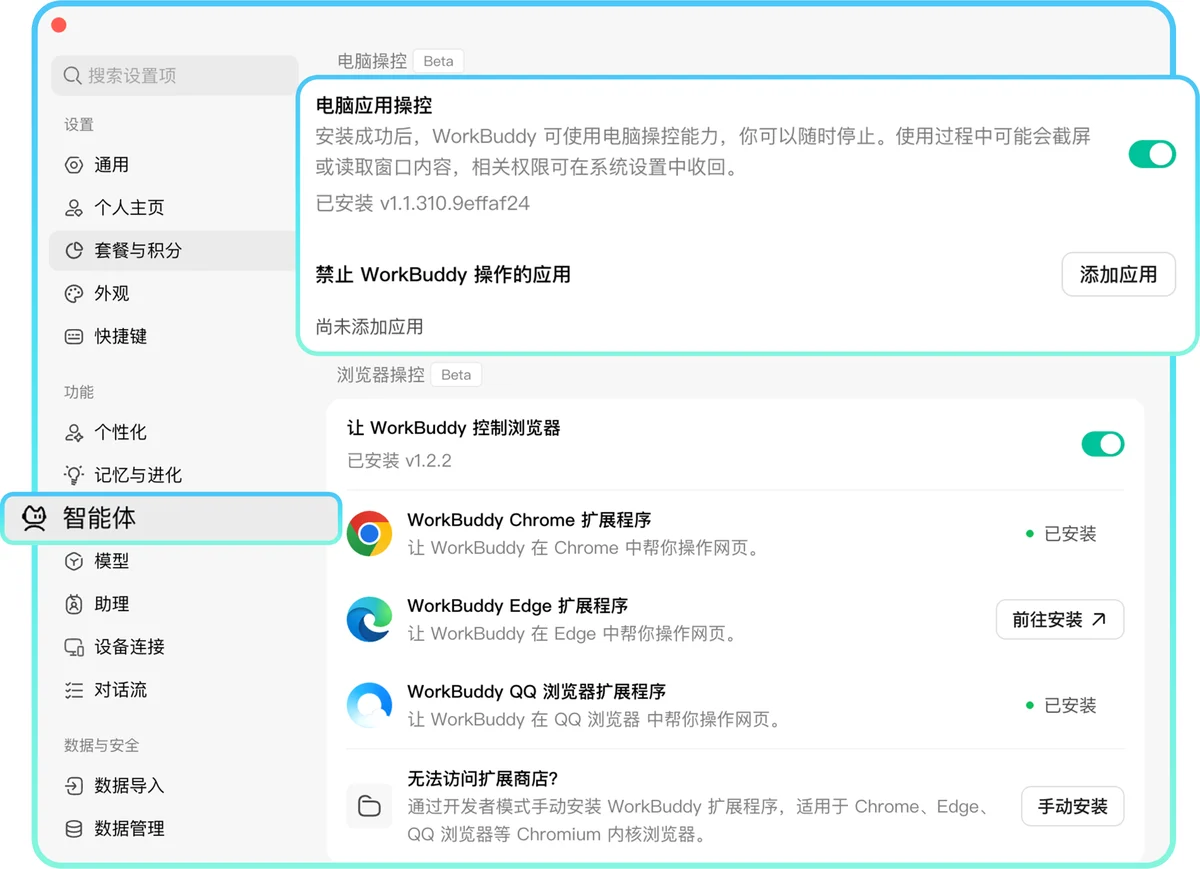
- you switch on desktop app control under Settings → Agents, then grant two system permissions when prompted: accessibility and screen recording;
- tasks run in the background, with a picture-in-picture panel showing the current step while you keep working in other apps;
- the launch demos show three scenarios: looking up a student by surname in a school system, logging equipment issued to a new employee in an asset system, and linking a warehouse system and an asset system through the same goods-receipt number.
How it differs from connectors and browser extensions
Until now, getting AI to "do things" meant one of two routes. Connectors and APIs are fast and reliable, but only if the software vendor opens them up. Browser extensions only work on web pages. Computer use covers the third category: desktop software with no API at all, such as on-premise ERP, older CRM versions and in-house admin tools.
The trade-off is clear. It works by reading the screen, so it is slower than an API, recognition quality varies by app, and WorkBuddy itself warns against using the same app while the AI is operating it. Where an API exists, use it; computer use is for the steps that only a person clicking could do before.
Three kinds of work marketing teams can hand over first
Based on the manual steps that eat the most time in our client projects, these three are the best places to start:
- Lookups and checks. Querying ad platforms, WeChat Official Account back ends or the CRM, exporting reports and comparing them line by line with another sheet. These tasks only read, so mistakes are cheap, and that is exactly the first step WorkBuddy recommends. If the numbers themselves are off, fix tracking first: see our GA4 under-reporting case study.
- Moving data between systems. Leads from trade shows, livestreams and forms often have to be retyped from the SCRM into headquarters' CRM. When the two are not connected, the AI can look up and fill in records by phone number or lead ID, with a person confirming before submission. For the bigger picture on lead handling, see two questions on B2B lead management.
- Routine checks. Testing every week that website forms submit, landing pages load, and how each AI platform answers questions about the brand. When we compile AI platforms' recommendations each month, we have an AI assistant open the share links and read out the recommended brands, then a person spot-checks the result. For choosing tools, see 6 questions for picking an AI visibility monitoring tool.
Set these boundaries before you start
WorkBuddy's own advice is practical, and it matches what we ask for in client projects:
- Start small. Begin with a lookup or a single record, and scale up only once the flow works;
- Stay present for sensitive steps. Logins, authorisations, payments, submissions and deletions should be confirmed by a person in real time, never handed over in bulk;
- Check in the original system. When the AI reports "done", look at the source system to confirm it found the right record and entered the right data;
- Accounts and data. Screen-recording permission means screen content is read. For systems holding customers' personal data, agree with legal and IT what the AI may operate, and use the "apps WorkBuddy may not operate" list to exclude the rest.
The other side: AI agents will use your website too
As computer and browser control spread, more and more "visitors" will not be people but AI agents researching, comparing specs and filling in forms on someone's behalf. For brands this extends GEO (generative engine optimisation): AI must not only understand your content but also complete actions such as a quote request or a brochure download.
- put key information in text, not only in images or PDFs;
- keep form fields clearly labelled and steps few, and avoid custom widgets that block submission;
- make sure pages are indexed by search engines first, or AI will not find you: see where the pages AI cites come from.
To find out how AI-friendly your website and social channels are, start with a digital footprint diagnosis. To keep improving how the brand shows up in AI answers, see our GEO service and tools such as Brand Pulse.
Update: WorkBuddy has since added a WeChat Pay AI card and can recommend, buy and pay for Meituan deals for users. See WorkBuddy adds a WeChat Pay AI card: how should brands prepare?
Key Data & Sources
| Data | Value | Source |
|---|---|---|
| WorkBuddy computer use launch post (2026-11-20) | WorkBuddy launches computer control (in Chinese) | Tencent WorkBuddy WeChat Official Account |
| WorkBuddy website and client download | workbuddy.cn | Tencent WorkBuddy |
FAQ
What is WorkBuddy's computer use?
A capability Tencent WorkBuddy launched in November 2026: the AI recognises a desktop app's interface on screen and completes tasks by simulating a person's clicks, typing and scrolling, without the app needing an API. It is in public beta on macOS and Windows.
How do you turn on computer use in WorkBuddy?
Update the client to version 5.11.0 or later, switch on desktop app control under Settings → Agents, and grant the accessibility and screen recording permissions when the first task prompts you.
What can marketing teams use it for?
Start with read-only tasks such as looking up and checking data in ad platforms, WeChat back ends and the CRM. Then try moving leads between systems and running routine checks on forms and landing pages. A person should confirm submissions, deletions and payments.
How should brand websites prepare for AI agents?
Put key information in text, keep forms simple and clearly labelled, and make sure pages are indexed by search engines. Then AI can both understand the content and complete actions such as quote requests or downloads for the user.